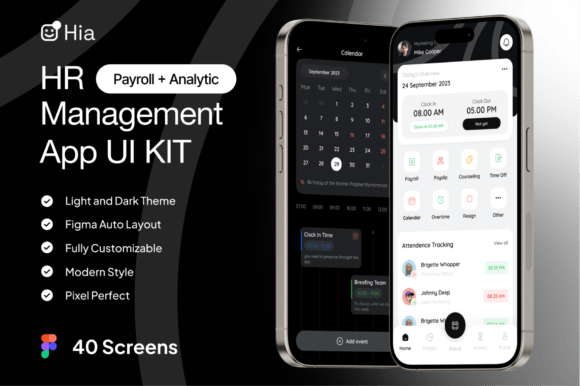
Hia HR Management App UI KIT
Building a robust human resources application from scratch is often one of the most daunting tasks for product teams. The complexity lies not just in the logic, but in creating an interface that balances administrative rigor with user-friendly design. This is where Hia - HR Management App UI KIT becomes an essential asset for designers and developers alike. Instead of wrestling with blank canvases and undefined style guides, this toolkit provides a comprehensive foundation to build a professional HR Management App UI KIT with precision and speed. It transforms the initial phase of product development from a time-consuming hurdle into a streamlined process.
Accelerating Development with 40 Ready-Made Screens
The sheer volume of screens required for a full-featured HR platform can be overwhelming. From employee onboarding dashboards to leave request forms, payroll summaries, and performance review interfaces, the scope is vast. Hia - HR Management App UI KIT addresses this by offering 40 distinct screens pre-designed and ready for implementation. This collection covers the critical workflows found in modern human capital management systems. By leveraging these existing layouts, teams can bypass the tedious task of drafting every single view from zero.
Consider a startup founder launching their first HR tool. Without a kit, they might spend weeks just finalizing the visual structure of the login and dashboard pages. With Hia, those foundational elements are already solved. The 40 screens serve as a blueprint, allowing the team to focus immediately on customizing the content and integrating specific business logic rather than debating button placement or grid alignment. This shift in focus allows for faster prototyping and earlier user testing, which is crucial for validating product-market fit.
Mastering Figma-Based Workflows
Modern design relies heavily on collaborative tools, and Figma has become the industry standard for interface design. Hia - HR Management App UI KIT is built natively within Figma, ensuring seamless integration into existing workflows. This compatibility means that design teams do not need to learn new software or struggle with file conversion issues. The kit leverages Figma's powerful features, such as components and auto-layouts, to create a dynamic environment where changes propagate efficiently across the entire project.
For freelancers and small agencies, this Figma-based approach is particularly valuable. It allows for rapid iteration when clients request changes. If a client decides to rebrand the app halfway through the project, the designer can update the master components within the Hia kit, and the changes will reflect across all 40 screens instantly. This efficiency reduces billable hours while increasing the quality of the final deliverable, making it easier to manage multiple projects simultaneously without sacrificing attention to detail.
Flexibility Through Dark Mode and Light Mode
User preference regarding display themes has evolved significantly in recent years. Many professionals prefer dark mode for extended periods of screen usage to reduce eye strain, while others favor light mode for its clarity during daytime work. A rigid design system that forces a single theme can alienate a portion of the user base. Hia - HR Management App UI KIT solves this by including both Dark Mode and Light Mode variants out of the box.
This dual-mode capability ensures that the resulting application feels native and comfortable regardless of the user's device settings or personal preferences. For example, an HR manager reviewing payroll data late at night will appreciate the dark theme, while a recruiter scanning resumes in a bright office may prefer the light version. By having both modes pre-configured, the design team avoids the common pitfall of building one theme and then struggling to manually invert colors and contrasts for the other, a process that often leads to accessibility errors.
Fully Customizable Design Systems
No two companies have identical branding requirements. A fintech company needs a different visual identity than a creative agency or a healthcare provider. One of the standout features of Hia - HR Management App UI KIT is its fully customizable nature. The color palettes are structured logically, making it easy to change the primary, secondary, and accent colors to match any brand guidelines. This flexibility extends beyond simple color swaps; the layout structures allow for significant modification without breaking the underlying design integrity.
Furthermore, the kit includes free use of Google Fonts, providing a wide range of typography options that are web-safe and scalable. Typography plays a critical role in readability, especially in data-heavy applications like HR software. Being able to swap fonts effortlessly allows designers to align the text hierarchy with the brand voice, whether that means using a clean sans-serif for a modern tech feel or a more traditional serif for a corporate environment. This level of control ensures that the final product feels bespoke rather than generic.
Streamlining Collaboration with Organized Layers
One of the biggest frustrations in using third-party UI kits is navigating disorganized files. Poorly named layers and chaotic groupings can turn a simple edit into a frustrating hunt. Hia - HR Management App UI KIT prioritizes organization, featuring well-organized layers that are intuitive to navigate. Every element is named clearly, and the file structure follows a logical hierarchy. This attention to detail significantly reduces the cognitive load on designers and developers who need to hand off the designs.
When a developer receives a design file where "Frame 1" contains the navigation bar and "Group 45" holds the main content, the risk of misinterpretation increases. With Hia, the naming convention is explicit, ensuring that the transition from design to code is smooth. This clarity fosters better communication between design and engineering teams, reducing back-and-forth questions and minimizing the chance of implementation errors. For entrepreneurs managing tight deadlines, this organizational efficiency translates directly into time saved and fewer bugs in the final release.
Scalability and Vector Editing
As an application grows, so does its complexity. The need for assets that remain crisp at any resolution is paramount. Hia - HR Management App UI KIT is 100% vector editable and scalable, meaning every icon, illustration, and shape can be resized without losing quality. This is essential for responsive design, where the same interface must look perfect on a smartphone, a tablet, and a large desktop monitor.
Additionally, each illustration included in the kit is organized and named very easily to use. Whether you need to extract a specific icon for a marketing banner or resize a background graphic for a splash screen, the vector format ensures versatility. This scalability future-proofs the design investment. As the product evolves and new features are added, the design assets remain flexible enough to adapt to new contexts without requiring a complete redesign.
Practical Considerations for Implementation
While Hia - HR Management App UI KIT offers extensive benefits, it is important to understand where it fits best in your workflow. It is an ideal starting point for MVP (Minimum Viable Product) launches, internal tools, and startups looking to validate their ideas quickly. However, for enterprise-level systems with highly unique, complex regulatory requirements, the kit should be viewed as a strong foundation rather than a final solution. Teams may still need to customize specific flows to meet niche compliance standards or integrate with legacy systems.
The kit also includes a guide for design system compatibility, which helps users maintain consistency as they expand beyond the provided 40 screens. This documentation is crucial for scaling the project. It teaches teams how to extend the component library correctly, ensuring that new screens adhere to the established visual language. By following these guidelines, organizations can maintain a cohesive user experience even as the application grows in size and functionality.
Who Benefits Most from This Toolkit?
This resource is particularly valuable for a diverse range of professionals. Freelance designers can use it to deliver high-quality prototypes to clients faster, increasing their throughput and profitability. Small business owners developing internal HR tools can save thousands of dollars in design costs while still achieving a professional look. Marketing teams creating mockups for investor pitches can leverage the polished visuals to present a more credible product vision.
Even educators teaching UI/UX design can utilize the kit to demonstrate best practices in layer organization, component creation, and responsive design. By analyzing the structure of Hia - HR Management App UI KIT, students can learn how professional design systems are constructed. Ultimately, anyone involved in the digital product lifecycle—from concept to launch—can find value in the efficiency and quality that this toolkit provides.
In conclusion, building a professional HR Management App UI KIT with this specific toolset empowers teams to focus on what truly matters: solving user problems and delivering value. By removing the friction of initial design setup, Hia - HR Management App UI KIT allows creativity to flourish where it counts most—in the details that make an application intuitive, accessible, and effective.