Unlocking Retro Creativity: A Guide to the Yellow Text Effect 3D Vintage Style
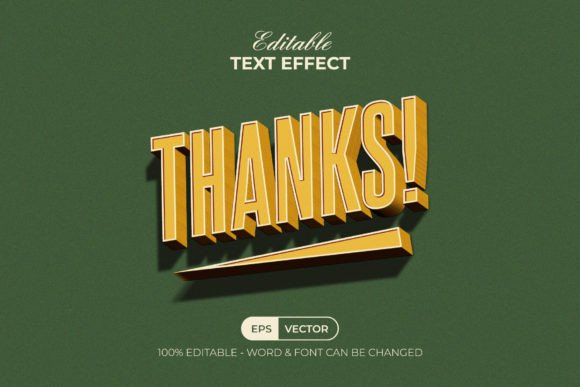
In the ever-evolving landscape of digital design, there is a persistent and powerful trend that refuses to fade: the nostalgia for the past. Whether it is the grainy textures of 1970s album covers or the bold typography of vintage advertising, retro aesthetics continue to captivate audiences today. Among these styles, the Yellow Text Effect 3D Vintage Style stands out as a vibrant, eye-catching solution for designers looking to inject warmth and character into their projects. This article explores what this effect is, how it works within modern software like Adobe Illustrator, and why it remains a valuable tool for both beginners and seasoned graphic artists.
The Allure of Vintage Typography in Modern Design
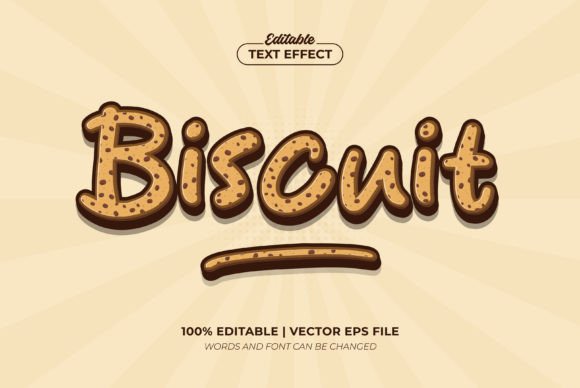
Before diving into the technical specifics, it is essential to understand why vintage text effects are so significant. In a world dominated by sleek, minimalist interfaces and flat design, vintage styles offer a sense of history, authenticity, and human touch. The specific combination of a 3D perspective with a warm yellow hue evokes feelings of optimism, energy, and nostalgia simultaneously. Yellow, often associated with sunshine and happiness, becomes even more striking when given depth through 3D rendering and textured with vintage wear.
This style is not merely decorative; it serves a functional purpose in branding and marketing. It can make a headline pop on a social media post, add a unique flair to a logo, or create an immersive atmosphere for a website banner. By utilizing pre-made effects like the Yellow Text Effect 3D Vintage Style, designers can achieve professional results without spending hours manually constructing complex layers and shadows.
Understanding the Tool: What Is Actually Included?
When you encounter a product described as the "Yellow Text Effect 3D Vintage Style," it is crucial to clarify what you are purchasing or downloading. A common misconception among beginners is that they are buying a new font. However, this item is strictly a graphic style effect, not a typeface. This distinction is vital for understanding its flexibility.
The package typically includes:
- 1 AI File: The native Adobe Illustrator file containing the master graphic style.
- 1 EPS File: A compatible version for broader software support.
- 1 JPEG Preview: A visual reference of how the final effect looks.
- 1 Read Me Text File: Instructions and links to download the free fonts used in the example.
The core value lies in the Graphic Styles menu integration. Once the file is opened in Adobe Illustrator, the complex layering, shading, and texture work required to create the 3D vintage look are encapsulated into a single click. This means you do not need to be an expert in 3D modeling or advanced vector manipulation to use it.
How to Apply the Effect: A Step-by-Step Overview
The beauty of this design asset is its user-friendly nature. The workflow is designed to be intuitive, allowing you to focus on creativity rather than technical hurdles. Here is how the process generally works:
- Open Your Project: Launch Adobe Illustrator CC or any version above. Open your existing project or start a new document.
- Create Your Text: Use the Type Tool to write your desired message. You can choose any font you have installed, though the preview may suggest specific free fonts for the best aesthetic match.
- Access the Graphic Styles: Navigate to the Graphic Styles panel. If the style is not automatically visible, open the included AI file and drag the style from the library into your current workspace.
- Apply the Magic: Simply select your text object and click the "Yellow Text Effect 3D Vintage Style" icon. Instantly, your flat text transforms into a rich, three-dimensional vintage element.
- Edit and Customize: Because the layers are well-organized, you can double-click the text to change the wording, adjust the color (switching from RGB to CMYK if needed), or tweak the size without breaking the effect.
This seamless integration demonstrates the power of vector graphics. Unlike raster images, which lose quality when resized, this effect remains crisp at any scale, making it perfect for everything from small business cards to large billboard advertisements.
Why Organization Matters in Design Assets
One of the most praised features of high-quality design assets like this one is the organization of layers. When working with complex 3D effects, files can quickly become messy, with hundreds of overlapping paths and masks. The Yellow Text Effect 3D Vintage Style is built with "well-organized layers," ensuring that every component—from the base shape to the highlight reflections—is easily accessible.
This organization empowers users to customize the effect beyond the default settings. Perhaps you want to change the yellow to a burnt orange for an autumn campaign, or maybe you need to remove the grunge texture for a cleaner look. With editable layers, these modifications are straightforward. This flexibility ensures that the asset grows with your project needs, rather than limiting your creative vision.
Bridging the Gap Between Hobbyists and Professionals
The accessibility of tools like this has democratized graphic design. In the past, achieving a high-end 3D vintage look required years of training in software techniques. Today, resources like the Yellow Text Effect 3D Vintage Style allow students, hobbyists, and small business owners to produce professional-grade visuals.
For the educational sector, these assets serve as excellent learning aids. Students can study the structure of the file to understand how professionals build depth, apply gradients, and simulate lighting. For business owners, it offers a cost-effective way to refresh their brand identity without hiring a full-time designer for every minor update. The ability to simply "retype the text" and see immediate results accelerates the creative workflow significantly.
Common Misunderstandings and Clarifications
Despite its ease of use, there are a few areas where users might face confusion. First, regarding the RGB Color mode mentioned in the description: this indicates the effect is optimized for digital screens. If you plan to print your design, you will likely need to convert the document to CMYK color mode before sending it to a printer. While the conversion is usually safe, it is always good practice to check color accuracy after switching modes.
Secondly, the mention of "Free Font Used" implies that the specific lettering seen in the preview might not be installed on your computer by default. The included Read Me Txt file is critical here, as it provides direct download links for these fonts. Without installing the correct font, the text may appear different than the preview, though the 3D effect itself will still apply correctly to whatever font you choose.
Finally, compatibility is key. This effect is suitable for Adobe Illustrator CC or above. Users with older versions of the software (such as CS6 or earlier) might encounter issues opening the file or applying the graphic style due to differences in how the software handles libraries and effects. Ensuring your software is up to date is a simple step that prevents frustration.
The Future of Vintage Aesthetics
As we move further into the digital age, the desire for analog warmth only intensifies. The Yellow Text Effect 3D Vintage Style represents more than just a downloadable file; it is a bridge between the tactile feel of the past and the precision of modern technology. It allows creators to tell stories that resonate emotionally, using visual language that feels familiar yet fresh.
Whether you are designing a poster for a local event, creating a logo for a coffee shop, or crafting social media content for a startup, this tool offers a reliable way to stand out. By leveraging well-organized, editable, and easy-to-use assets, you can focus on what truly matters: your message and your audience.
If you have any questions about integrating this style into your workflow or need assistance with the installation process, remember that the community of designers is vast and supportive. Don't hesitate to explore the possibilities that come with mastering these vintage effects. After all, great design is not just about what you create, but how effortlessly you can bring your vision to life.