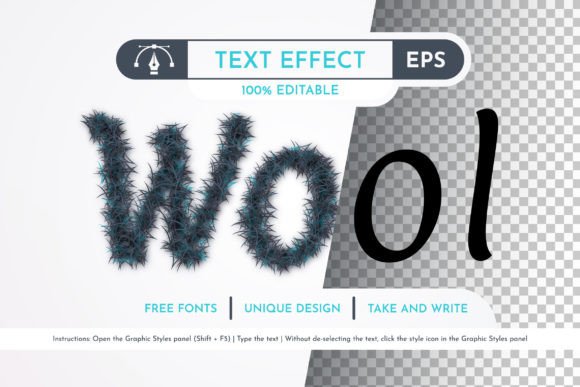
Dark Wool Editable Text Effect for Illustrator
Creating professional typography often feels like a balancing act between creativity and technical precision. Designers frequently struggle to add texture and depth to their headlines without compromising the clean lines of vector graphics. The Dark Wool Editable Text Effect solves this common challenge by offering a sophisticated, tactile look that transforms simple text into a visual focal point. Whether you are designing a logo, a book cover, or a marketing flyer, this resource provides an immediate upgrade to your typographic style.
This effect is specifically crafted for users of Adobe Illustrator CC 2014 or later versions. It bridges the gap between flat design and rich, textured visuals, allowing you to apply a premium wool-like finish to any headline with just a few clicks. Unlike raster images that pixelate when enlarged, this tool remains sharp and crisp at any size, making it an essential asset for both digital screens and high-resolution print materials.
Understanding the Vector Advantage
The core strength of the Dark Wool text effect lies in its vector format. In the world of graphic design, vectors are mathematical descriptions of shapes rather than grids of colored pixels. This distinction is crucial for anyone who needs flexibility in their workflow. When you apply the Dark Wool Editable Text Effect, you are working with scalable geometry that can be resized infinitely without losing quality.
This capability is particularly valuable for projects that span multiple mediums. Imagine creating a title for a social media post and then needing to use the same design on a large billboard. With a standard image file, the billboard version would likely appear blurry or blocky. However, because this effect is built on vector principles, you can scale it up or down effortlessly. You can rotate the text, adjust the curvature, or change the dimensions while maintaining perfect edge definition.
Furthermore, the vector nature of the file means that color customization is straightforward. The dark wool aesthetic is striking, but every project has unique branding requirements. With this tool, changing the hue of the "wool" fibers is as simple as selecting the layer and applying a new fill color. This adaptability ensures that the effect complements your specific palette rather than forcing you to work around it.
Streamlined Workflow with Organized Layers
One of the most frustrating aspects of using third-party design assets is encountering messy files with hidden layers or complex groupings that are difficult to navigate. The creator of this resource, Aleksandr Gusev, has prioritized usability by ensuring all layers are strictly organized. This attention to detail significantly reduces the time spent untangling paths and allows you to focus on the creative aspects of your project.
When you open the included AI or EPS file, you will find a logical structure where each element of the texture is clearly defined. This organization is not just about neatness; it empowers you to make granular adjustments. If you need to tweak the density of the wool texture or modify how the light interacts with the fibers, you can do so directly within the layers panel without affecting other parts of the design.
To further enhance efficiency, the effect has been added to the Graphic Styles panel. This feature is a game-changer for designers who need to maintain consistency across multiple documents. Instead of manually recreating the effect for every new headline, you can simply select your text and click the style name. The Dark Wool Editable Text Effect instantly applies, saving hours of repetitive work and ensuring a uniform look throughout your entire brand identity.
Practical Applications for Creators and Businesses
The versatility of this text effect makes it suitable for a wide range of applications across personal and professional contexts. For small business owners and entrepreneurs, strong headlines are vital for capturing attention in a crowded market. Using the Dark Wool text effect on a product packaging label can convey a sense of warmth, craftsmanship, and natural quality. It works exceptionally well for brands in the fashion, home decor, and organic food sectors where texture plays a key role in consumer perception.
Freelancers and marketers can leverage this resource to create standout social media graphics. A bold, textured headline stands out more effectively in a news feed than plain sans-serif text. The depth provided by the wool texture adds a three-dimensional quality that draws the eye and encourages engagement. Educators and content creators can also use it to make presentation slides and course materials more visually engaging, helping to retain student interest.
In the realm of print design, the effect shines even brighter. Because the file is fully ready for use and print, you can send it directly to a printer with confidence. The high-quality vector output ensures that the intricate details of the wool texture are reproduced accurately on paper, fabric, or promotional merchandise. From magazine covers to event posters, this effect adds a touch of elegance that elevates the perceived value of the final product.
Technical Requirements and File Compatibility
Before integrating this resource into your workflow, it is important to verify your software compatibility. The Dark Wool Editable Text Effect is designed for Adobe Illustrator version CC 2014 or latest. This requirement ensures that you have access to the necessary tools for editing vector paths and managing graphic styles effectively. If you are using an older version of Illustrator, you may encounter issues opening the file or applying the styles correctly.
The package includes a comprehensive set of files to support various needs. You will receive one AI file, which is the native format for Illustrator and offers full editability. Additionally, an EPS file is included, providing a universal format that can be opened in other vector-based software if needed. The package also contains a dedicated Graphic Styles file, a help file with information about the fonts used, and a detailed instruction manual.
It is worth noting that the font used in the preview images may differ from your system's default library. The help file provides clear information on the specific typeface used, allowing you to download or substitute it with a similar font if necessary. This transparency helps prevent confusion and ensures that your final design matches the intended aesthetic.
Support and Continuous Improvement
Using digital assets is a collaborative process between the creator and the user. Aleksandr Gusev actively encourages feedback to improve the quality of his store and resources. If you encounter any errors, such as missing links, rendering issues, or unexpected behavior in the layers, you are invited to report them directly. This commitment to fixing problems ensures that the community benefits from continuous updates and refinements.
By reporting shortcomings, you contribute to a better experience for future users and help maintain the high standards of the marketplace. The creator values this interaction and is dedicated to resolving any technical hurdles quickly. This level of support adds significant value to the purchase, providing peace of mind that assistance is available if something does not work as expected.
Ultimately, the Dark Wool Editable Text Effect is more than just a graphic file; it is a tool designed to empower your creativity. By combining professional-grade vector technology with an intuitive, organized structure, it removes the technical barriers that often slow down the design process. Whether you are a beginner looking to impress with your first project or a seasoned professional seeking to streamline your workflow, this resource offers a reliable and attractive solution for your typography needs.