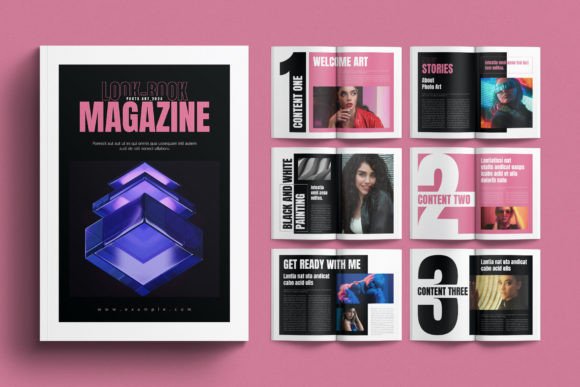
Lookbook Magazine Template: A Practical Evaluation for Design Professionals
In the competitive landscape of visual storytelling, the quality of a presentation often determines the success of a proposal. For fashion designers, product photographers, and creative directors, the lookbook serves as the primary vehicle to communicate brand identity and seasonal concepts to clients. However, building these documents from scratch in Adobe InDesign can be a time-consuming process that detracts from actual creative work. This is where a robust Lookbook Magazine Template becomes an essential asset in a professional workflow. Specifically, the 16-page edition designed for modern and minimal aesthetics offers a structured foundation that balances elegance with functional efficiency.
The core value of this template lies not just in its visual appeal, but in its technical architecture. It is engineered to streamline the production of high-end editorial layouts without requiring advanced scripting or complex design skills. By providing a pre-organized framework, it allows professionals to focus on curating imagery and refining copy rather than wrestling with grid systems and margin settings. Whether you are a freelancer pitching to a new client or an in-house team preparing a quarterly review, the ability to deploy a polished, consistent layout quickly is a significant operational advantage.
Technical Specifications and Compatibility
Before evaluating the aesthetic merits of any design resource, one must verify its technical viability within your existing software environment. The Lookbook Magazine Template addresses a common pain point in the industry: version compatibility. Many templates are built exclusively for the latest versions of Adobe InDesign, rendering them unusable for studios still operating on slightly older infrastructure.
This specific template resolves that friction by offering three distinct file formats:
- .INDD files: Fully compatible with Adobe InDesign CC (Creative Cloud), ensuring access to the most recent features and cloud libraries.
- .INDT files: An intermediate format that maintains backward compatibility while preserving editable text and object links.
- .IDML files: Crucial for users running legacy versions such as InDesign CS4, CS5, and CS6, ensuring broad accessibility across different studio setups.
Furthermore, the template adheres to standard print production requirements. It is available in both International A4 and US Letter sizes, making it versatile for global distribution. The inclusion of a 3mm (0.125 in) bleed size is a critical detail often overlooked in lower-quality templates. Proper bleeds ensure that when the document is printed and trimmed, there are no unwanted white edges, maintaining the professional finish expected in high-end publishing. The color mode is set to CMYK by default, which is non-negotiable for print-ready materials, preventing the color shifts that occur when converting from RGB at the last minute.
Design Philosophy: Minimalism and Grid Systems
The visual language of this 16-page template is defined by a modern, elegant, and minimal approach. In the context of lookbooks, less is often more. A cluttered layout can distract from the products or photography, which should be the focal point. This template utilizes a clean grid system that guides the eye naturally through the narrative of the collection.
The use of neutral color palettes provides a sophisticated backdrop that does not compete with the imagery. However, the "neutral" aspect is not a limitation but a strategic choice. Because all elements are organized into separate layers—images, text, and background—the user retains complete control over the visual hierarchy. The template comes with premade neutral colors, yet the structure allows for rapid rebranding. With a single click, users can swap the entire color palette to match their specific brand guidelines. This flexibility ensures that the template can serve multiple clients or evolve alongside a brand's changing identity without needing to rebuild the layout from the ground up.
Workflow Efficiency and Editability
The true test of a template is how it performs during the editing phase. A beautiful static design is useless if it cannot be modified efficiently. The Lookbook Magazine Template excels in this regard due to its rigorous organization. Every element is aligned to a master grid, and objects are segregated into logical layers. This means that when a photographer delivers a new image, placing it into the layout is a straightforward task that does not disrupt surrounding typography or decorative elements.
Typography is another area where this template saves valuable time. It includes predefined Character and Paragraph Styles. These styles ensure consistency in font sizing, leading, kerning, and alignment throughout the 16 pages. If a decision is made to change the body font for the entire document, updating the paragraph style applies the change globally instantly. Additionally, the template uses free fonts, with direct links provided in the included help file. This removes the legal and logistical hurdles associated with purchasing expensive typefaces for a single project, making it a cost-effective solution for freelancers and small businesses.
Real-World Application and Audience Fit
Who benefits most from this resource? The answer spans a wide demographic of creatives and business owners. Fashion designers launching a new collection can use this template to create a compelling digital or print PDF for buyers. Product photographers can showcase their portfolio in a cohesive magazine format rather than a simple gallery slide show. Entrepreneurs and small business owners selling lifestyle products can present their catalogues with a level of polish usually reserved for major retail brands.
For educators and serious hobbyists, this template serves as an excellent educational tool. By examining the layer structure and master pages, students can learn best practices in InDesign, such as proper grid usage, style management, and preparation for print. The inclusion of a detailed help file further supports this learning curve, guiding users through the setup process and explaining how to customize the brand colors and replace images.
It is important to note a realistic limitation: photographs and mockups are not included. This is a standard practice for professional templates to avoid copyright issues and to keep file sizes manageable. Users must supply their own high-resolution imagery. While this requires an additional step in the workflow, it ensures that the final output is unique to the creator's content. The template provides the stage; the user provides the performance.
Long-Term Value and Reliability
Investing in a high-quality template like this 16-page Lookbook Magazine Template offers long-term value beyond a single project. Once the initial customization is done to fit a specific brand palette, the file can be saved as a master for future seasons or collections. The modular nature of the 16-page structure means it can be easily expanded or condensed depending on the volume of content. If a client requests a shorter version, pages can be deleted without breaking the flow of the remaining content thanks to the robust master page setup.
Reliability in design assets is paramount. A template that crashes upon opening or fails to link correctly causes delays and frustration. The comprehensive support for various InDesign versions (CC, CS4–CS6) suggests a high level of development care. The separation of layers and the use of standard grids minimize the risk of layout errors during the editing process. This reliability translates directly into professional credibility; when a client receives a perfectly formatted, visually stunning lookbook, it reflects positively on the designer's competence and attention to detail.
Ultimately, the Lookbook Magazine Template is more than just a set of pre-designed pages. It is a productivity tool that bridges the gap between creative vision and practical execution. By handling the technical complexities of layout, typography, and print preparation, it empowers creators to focus on what they do best: telling a compelling visual story. For anyone looking to elevate their presentation standards without incurring excessive costs or time investments, this resource represents a pragmatic and effective solution.