Evaluating the Minimalist PowerPoint Template for Professional Presentations
In the landscape of digital communication, the clarity of a presentation often determines its success. The Minimalist PowerPoint Template has emerged as a significant tool for professionals seeking to streamline their visual storytelling. This template is designed to strip away unnecessary distractions, focusing strictly on content and structure. It is a ready-to-use solution that offers easy editing capabilities, making it accessible for users ranging from creative agencies to individual entrepreneurs. Understanding the specific attributes, benefits, and limitations of this template is essential for anyone considering it for their next pitch deck, company profile, or portfolio.
Defining the Minimalist PowerPoint Template
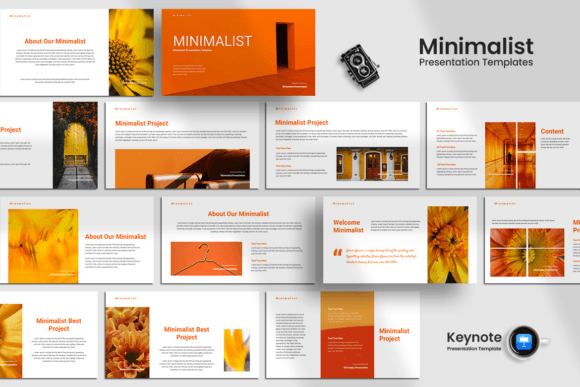
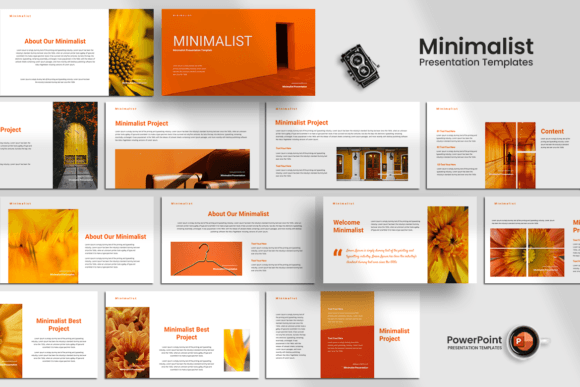
The Minimalist PowerPoint Template is not merely a collection of slides; it is a design philosophy applied to a functional file format. At its core, this template utilizes a clean aesthetic characterized by ample white space, simple typography, and a restrained color palette. It typically includes 15 unique custom slides per template, adhering to the standard 16:9 aspect ratio required for modern projectors and screens. The design relies on free fonts, ensuring compatibility across different devices without licensing issues.
Technically, the main file provided is a PPTX format, which is universally compatible with Microsoft PowerPoint and most other presentation software. The template features drag-and-drop image functionality and dedicated image placeholders, allowing users to insert their own photography or graphics effortlessly. Unlike templates that rely on complex animations or heavy graphical elements, this option prioritizes editable text, shapes, and photos. This approach ensures that the user maintains full control over the narrative while benefiting from a pre-structured layout.
Why Professionals Choose a Minimalist Approach
There are several compelling reasons why individuals and organizations gravitate toward a Minimalist PowerPoint Template. The primary driver is often the need for clarity. In business environments, particularly during startup pitch decks or corporate reports, the audience's attention span is limited. A cluttered slide can obscure key data points, whereas a minimalist design forces the viewer to focus on the message.
Furthermore, versatility is a major factor. This template is marketed for various purposes, including creative agency portfolios, personal portfolios, photography showcases, and company profiles. The neutral nature of the design allows it to adapt to different brand identities. For a photographer, the large image placeholders highlight the work. For a startup founder, the structured layouts provide a logical flow for financial projections and market analysis. The ability to easily change colors and edit shapes means the same base template can serve multiple distinct needs within an organization.
Benefits and Practical Advantages
The practical advantages of using this template are rooted in efficiency and professionalism. First, the time-saving aspect cannot be overstated. Creating a cohesive presentation from scratch requires significant design effort. With 15 pre-designed slides, the structural work is already done. Users can focus on refining their content rather than aligning boxes or adjusting font sizes.
Secondly, the "easy editable" nature of the template lowers the technical barrier to entry. Features like drag-and-drop images and fully editable text allow non-designers to produce high-quality results. The inclusion of free fonts eliminates the risk of missing typefaces when sharing files with clients or investors who may not have premium font libraries installed.
Additionally, the 16:9 ratio ensures that the presentation looks modern and fits contemporary display standards. The unique custom slides offer variety without breaking the visual consistency, preventing the presentation from becoming monotonous while maintaining a professional tone. For those presenting a company profile or a corporate update, this consistency reinforces brand reliability.
Tradeoffs and Considerations
While the benefits are clear, there are tradeoffs to consider before selecting the Minimalist PowerPoint Template. The most significant limitation is the lack of included images. The template provides placeholders, but users must source their own high-quality photographs or illustrations. If a user expects a complete package with stock imagery, they will need to budget additional time or resources to find suitable visuals.
Another consideration is the level of customization required to make the template truly unique. Because the design is so popular, there is a risk that a presentation could look generic if the user does not put effort into customizing the colors and content. The simplicity of the design places a higher burden on the quality of the actual text and data presented. Poorly written content will stand out more starkly against a clean background than it would against a busy, distracting one.
Users should also be aware that while the template is "fully editable," complex modifications might require a basic understanding of PowerPoint's shape and layer tools. While it is easier than starting from scratch, it is not entirely automated. The user must still possess the skills to manipulate the elements effectively to suit their specific branding guidelines.
Ideal Use Cases for This Template
The Minimalist PowerPoint Template is a strong fit for specific scenarios where clarity and professionalism are paramount. It is exceptionally well-suited for Startup Pitch Decks, where investors expect concise, data-driven slides without visual noise. Similarly, it works well for Personal Portfolios and Creative Agency proposals, where the work itself should take center stage rather than the slide design.
For Corporate and Business presentations, such as quarterly reviews or strategic planning sessions, the template provides a serious and focused atmosphere. It is also ideal for Photography portfolios, as the layout naturally accommodates large, high-resolution images. Any situation requiring a quick turnaround with a polished final product benefits from this template's ready-to-use structure.
When to Consider Alternatives
Despite its strengths, there are situations where alternatives may be worth considering. If a presentation requires heavy animation, complex transitions, or a highly stylized, artistic theme, a minimalist template might feel too restrictive. Industries that rely on vibrant, energetic visuals—such as children's entertainment or certain marketing campaigns—might find the restrained aesthetic insufficient.
Furthermore, if a user has zero access to high-quality imagery, a template that includes stock photos might be a better initial choice. While the minimalist template offers placeholders, the absence of built-in images means the final product will look incomplete until the user fills them. For teams with very tight deadlines and no design resources, a more comprehensive package with integrated assets might reduce friction.
Decision-Making Insights
Deciding whether the Minimalist PowerPoint Template aligns with your goals requires an honest assessment of your content and resources. Ask yourself if your primary need is a clean framework to organize information or a decorative shell to hide weak content. If you have strong data and compelling stories but lack design time, this template is likely the right choice. It empowers you to present with confidence, knowing the visual foundation is solid.
Consider your audience. Are they looking for quick facts and clear takeaways? If so, the minimalist approach serves them best. However, if your goal is to entertain or immerse the audience in a sensory experience, you may need a more elaborate design system. Ultimately, this template is a tool for efficiency and clarity. It excels when used by professionals who understand that the best design is often the one that gets out of the way and lets the message shine.