Evaluating the Business Deck PowerPoint Template for Professional Presentations
In the landscape of corporate communication, the quality of a presentation often dictates the reception of the ideas it contains. Professionals seeking to convey complex data, company profiles, or strategic roadmaps frequently turn to pre-designed resources to ensure visual consistency and efficiency. The Business Deck PowerPoint Template represents one such resource, designed to bridge the gap between raw content and polished delivery. This article explores the specific attributes of this template, compares it with alternative approaches, and helps you determine if it aligns with your specific project requirements.
Defining the Core Value of the Business Deck PowerPoint Template
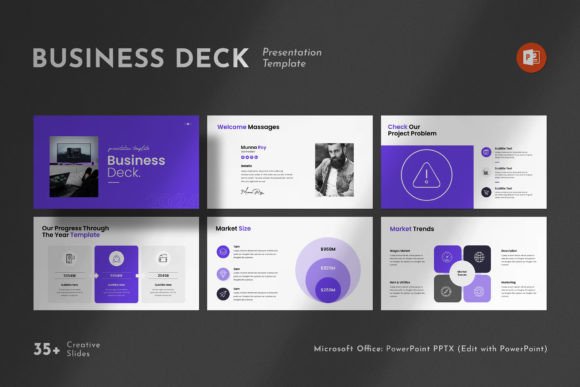
The primary function of the Business Deck PowerPoint Template is to provide a structured, visually cohesive framework for business storytelling. Unlike blank canvases that require extensive design work from scratch, this template offers a contemporary aesthetic that balances simplicity with functional depth. It includes thirty-six distinct slides, covering a wide range of presentation needs from introductory overviews to detailed financial breakdowns.
What distinguishes this particular template is its focus on "clean" design principles. In an era where audiences are bombarded with information, a cluttered slide deck can obscure key messages. This template utilizes creative photo layouts, vector icons, and infographics to organize information logically. By incorporating elements like tables and diagrams directly into the master structure, it allows users to present data without needing advanced graphic design skills. The inclusion of free fonts ensures that the typography remains professional across different operating systems, while the 16x9 Full HD ratio (1920x1080px) guarantees compatibility with modern projection standards and high-definition screens.
Comparing Pre-Built Templates vs. Custom Design
When preparing a critical business presentation, decision-makers often weigh the option of using a pre-built solution like the Business Deck PowerPoint Template against hiring a designer for a custom creation or building slides manually. Each approach carries distinct tradeoffs regarding time, cost, and flexibility.
Time Efficiency: Building a presentation from scratch involves significant time investment in layout alignment, color theory application, and asset sourcing. The Business Deck PowerPoint Template accelerates this process through its "easy drag and drop" functionality. Users can replace placeholder images and text instantly, reducing the production timeline from days to hours. In contrast, custom design requires iterative feedback loops, which can delay final delivery.
Cost Considerations: For small businesses or individual consultants, the cost of hiring a professional designer for every presentation may be prohibitive. A template offers a one-time acquisition cost that yields reusable assets. While not free, the value proposition lies in the comprehensive feature set—thirty-six slides including infographics and charts—which would otherwise require purchasing multiple separate assets or paying hourly rates for design work.
Flexibility and Consistency: A potential limitation of templates is the risk of looking generic if not customized properly. However, because the Business Deck PowerPoint Template is based on Master Slides, it maintains structural integrity even when edited. Every graphic is resizable and editable, allowing for deeper customization than rigid online presentation tools. Conversely, manual design offers unlimited creativity but risks inconsistency if the user lacks a strong design eye.
Technical Compatibility and Workflow Integration
A critical factor in selecting any digital asset is its technical compatibility with your existing workflow. The Business Deck PowerPoint Template is engineered to work seamlessly on both Apple and Windows-based systems. This cross-platform support is essential for collaborative environments where team members may use different operating systems. The file format is standard PPTX, ensuring that features like animations, transitions, and embedded media function as intended without requiring conversion software.
The reliance on Master Slides is a significant technical advantage. When a user modifies a font size or color scheme on the master slide, the change propagates throughout all thirty-six slides. This feature saves considerable time during revisions. Furthermore, the template uses free fonts, eliminating the common issue of missing typefaces when files are opened on different computers. However, users should note that the support images used in demo versions are not included; they must source their own high-quality photography to fully realize the template's visual potential.
Strengths and Limitations in Real-World Scenarios
To make an informed decision, it is necessary to examine where the Business Deck PowerPoint Template excels and where it might fall short depending on your specific use case.
- Ideal for Corporate Profiles and Pitch Decks: The combination of clean layouts and infographic-ready slides makes this template particularly well-suited for company introductions, investor pitches, and annual reports. The ability to visualize data through built-in charts helps stakeholders grasp financial metrics quickly.
- Best for Teams with Limited Design Resources: If your organization does not have a dedicated graphic designer, this template provides a safety net. It ensures that even non-designers can produce output that looks professional and consistent.
- Limitation: Brand Specificity: While the template is fully editable, heavily branded companies with strict style guides may find the base design too generic. Extensive rebranding might be required to match specific corporate colors and logo placements, which could negate some of the time-saving benefits.
- Limitation: Content Dependency: The visual impact relies heavily on the quality of the images you insert. Since demo images are excluded, the final look depends entirely on your ability to source professional-grade photography or illustrations.
Decision Factors: Is This Template Right for You?
Determining whether the Business Deck PowerPoint Template is the right choice involves assessing your immediate needs against the available alternatives. If your priority is speed and you need to deliver a high-quality presentation within a tight deadline, this template offers a robust solution. The thirty-six-slide structure covers most standard business scenarios, reducing the need to search for additional add-ons.
However, if your project requires highly unique, avant-garde visuals that defy standard business aesthetics, a custom design service might be more appropriate. Similarly, if you are creating a simple, text-heavy document for internal reading rather than a visual presentation, the overhead of managing a full HD, graphic-rich template may be unnecessary.
Another consideration is the level of support required. This template comes with access to real support from skilled designers. This is a valuable asset for users who encounter technical hurdles or need guidance on how to best utilize specific slide features. In contrast, many free or low-cost alternatives offer no support, leaving users to troubleshoot issues independently.
Maximizing the Utility of Your Presentation Assets
Once you decide to utilize the Business Deck PowerPoint Template, maximizing its potential requires a strategic approach to editing. Start by reviewing the help file included with the download; it often contains shortcuts and tips for navigating the Master Slide view. Take advantage of the resizable graphics to fit your specific data points without distorting the layout. Ensure that all inserted images are high resolution to maintain the Full HD clarity of the 1920x1080px canvas.
Remember that the strength of this tool lies in its balance of structure and flexibility. Use the provided infographics to tell a story with your data, but do not feel constrained by them. The vector icons and diagrams are designed to be modified, allowing you to tailor the visual narrative to your exact message. By leveraging these features effectively, you can elevate your company profile and present your work at a professional level that commands attention and respect.
Ultimately, the choice of presentation tool should serve the content, not overshadow it. The Business Deck PowerPoint Template offers a pragmatic middle ground between the rigidity of automated generators and the complexity of custom design, making it a viable option for professionals aiming for clarity, consistency, and impact.