Medical Digital Magazine Landscape: A Workflow Guide for Professional Publishing
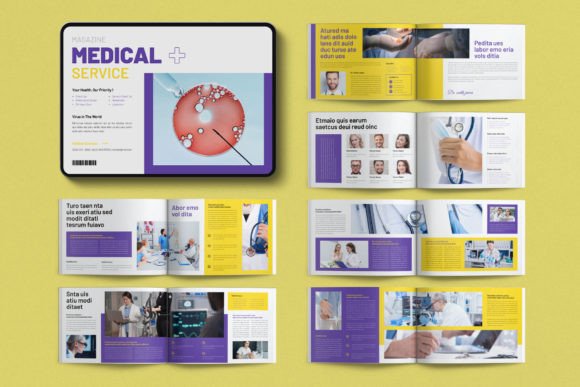
In the evolving ecosystem of digital publishing, the ability to present complex medical concepts with clarity and visual elegance is paramount. The Medical Digital Magazine Landscape serves as a foundational asset for designers, editors, and publishers aiming to streamline their production cycles. This 16-page template, specifically engineered for Adobe InDesign, bridges the gap between raw content and polished presentation. It is not merely a static file but a dynamic framework designed to accommodate modern, minimal, and elegant design philosophies required in the healthcare and wellness sectors.
For professionals ranging from freelance graphic designers to established marketing agencies, integrating a robust template like this into your workflow can significantly reduce turnaround times while elevating the quality of client deliverables. By understanding how to leverage its specific features—such as organized layers, grid alignment, and flexible color palettes—users can focus more on content strategy and less on mechanical layout tasks.
Understanding the Template Structure and Design Philosophy
The core value of the Medical Digital Magazine Landscape lies in its structural integrity. Unlike generic templates that often require extensive restructuring, this resource is built upon a solid grid system. Every element, from text boxes to image placeholders, is aligned to ensure visual consistency across all 16 pages. This adherence to a grid is crucial in medical publishing, where information density is high, and readability must never be compromised by chaotic layouts.
The design philosophy embraces minimalism. In the medical field, trust is established through clarity. Cluttered designs can obscure critical data or diminish the perceived authority of the publication. This template provides a neutral canvas that allows the subject matter to take center stage. Whether you are presenting clinical trial results, patient education materials, or industry trends, the clean lines and balanced whitespace inherent in the design facilitate a professional aesthetic.
Furthermore, the template addresses the practical reality of global publishing standards. It is available in two distinct sizes: International A4 and US Letter. This dual-format availability ensures that creators do not need to manually resize assets when working with international clients or distributing content across different geographic markets. The inclusion of a standard 3mm (0.125 in) bleed size prepares the document for both print reproduction and high-resolution digital export, covering the technical bases before the creative work even begins.
Integrating the Template into Your Production Workflow
Effective use of the Medical Digital Magazine Landscape begins during the pre-production phase. Before opening Adobe InDesign, it is beneficial to map out the content flow against the 16-page structure. Because the template utilizes Master Pages, any changes made to headers, footers, or page numbers propagate automatically throughout the document. This feature is a time-saver during the planning stage, allowing teams to establish a consistent visual hierarchy early on.
During the execution phase, the organization of elements into separate layers becomes a critical workflow advantage. The template separates Images, Text, and Backgrounds into distinct layers. For a collaborative environment, this means a copy editor can adjust text without accidentally shifting an image, and a designer can tweak background textures without disrupting the typography. This separation reduces errors and simplifies version control, which is essential when managing multiple rounds of client feedback.
Color management is another area where this template enhances efficiency. While it comes with a premade neutral color palette suitable for medical themes, the real power lies in its adaptability. Through the linked color swatches, users can change the entire brand identity of the magazine with a single click. This is particularly useful for agencies managing multiple clients; a single base file can be rapidly customized to match the specific brand guidelines of a hospital network, a pharmaceutical company, or a health tech startup.
Technical Compatibility and Software Integration
One of the most significant barriers in digital asset adoption is software compatibility. The Medical Digital Magazine Landscape addresses this by providing files compatible with a wide range of Adobe InDesign versions. Users will find INDD files for current Creative Cloud (CC) versions, INDT files for older CC iterations, and IDML files for legacy versions such as CS4, CS5, and CS6. This backward and forward compatibility ensures that the asset remains accessible regardless of the specific software version installed on a user's machine.
However, successful integration requires attention to font licensing and linking. The template relies on free fonts, with links provided in the accompanying help file. When importing the project, it is standard procedure to verify that these fonts are correctly linked within the Links panel of InDesign. If fonts are missing, the document may default to substitute typefaces, altering the intended design metrics. Ensuring the correct font installation before starting the layout process prevents last-minute formatting issues and maintains the typographic integrity of the final product.
The RGB color mode setting is also a key consideration for digital-first workflows. While print projects typically require CMYK conversion, the native RGB mode makes this template immediately ready for web viewing, tablet distribution, and social media promotion. For hybrid projects that require both print and digital outputs, the workflow involves converting the color space at the export stage rather than during the design phase, preserving the vibrancy of images for screen consumption.
Practical Implementation Strategies for Different User Types
Freelancers and Small Business Owners: For independent creators, speed is currency. Using this template allows for rapid prototyping. You can assemble a pitch deck or a sample issue in hours rather than days. The pre-organized paragraphs and character styles mean that text formatting is automated. Once the style is applied, headings, body text, and captions adopt the correct font size, weight, and spacing instantly. This automation frees up mental energy to focus on sourcing high-quality imagery and refining the narrative.
Marketing Agencies and Publishers: Larger teams benefit from the scalability of the template. The ability to swap brand colors instantly allows for the creation of variations for different departments or sub-brands without rebuilding the layout. Additionally, the layered structure supports a division of labor. One team member can manage the master pages and branding, while another focuses on populating the text frames and placing photographs. The clear separation of concerns minimizes merge conflicts and streamlines the review process.
Educators and Content Creators: For those producing educational materials, the grid system ensures that complex diagrams and charts align perfectly with explanatory text. The neutral background prevents distraction, keeping the learner focused on the medical content. Since the template is fully editable, educators can insert interactive elements or QR codes (if exporting for digital PDF) directly into the designated image layers, creating a bridge between static content and multimedia resources.
Optimizing for Quality Control and Long-Term Use
To maximize the utility of the Medical Digital Magazine Landscape, establishing a quality control checklist is advisable. Before finalizing a project, verify that all images are high-resolution and correctly placed within the bleed area. Check that all text frames are flowing correctly and that no orphaned lines or widows exist, which can disrupt the reading rhythm. Because the template uses paragraph styles, running a "Find/Change" operation to audit style usage can quickly identify any manual overrides that might break consistency.
Long-term maintenance of the template is also straightforward. As design trends evolve, the modular nature of the file allows for updates. If a new brand guideline requires a shift in typography, updating the Character Styles in the library reflects the change across all 16 pages. Similarly, if the color palette needs refreshing, the one-click swatch update mechanism ensures the magazine remains current without requiring a complete redesign.
It is important to note that while the template includes mockups and instructions, the actual photographs are not included. This is a deliberate choice to avoid licensing issues and to encourage the use of original, high-quality imagery relevant to the specific story being told. Sourcing authentic medical photography adds credibility and emotional resonance that stock images often lack. The template acts as the vessel, but the content creator must provide the substance.
Conclusion on Workflow Efficiency
The Medical Digital Magazine Landscape represents a strategic tool for anyone involved in the creation of professional medical publications. By offering a balance of rigid structure and flexible customization, it supports a wide array of use cases from initial concept pitches to final production runs. Its compatibility across software versions, combined with intelligent layer organization and color management, removes many of the friction points associated with traditional layout design.
Ultimately, the success of using this template depends on how well it is integrated into the broader creative process. When used effectively, it transforms a potentially tedious layout task into a streamlined, efficient workflow. It allows professionals to maintain high standards of design and consistency while focusing their expertise on the most critical aspect of any publication: the message itself. For those looking to elevate their medical publishing output, adopting such a structured, editable foundation is a practical step toward greater productivity and professional excellence.