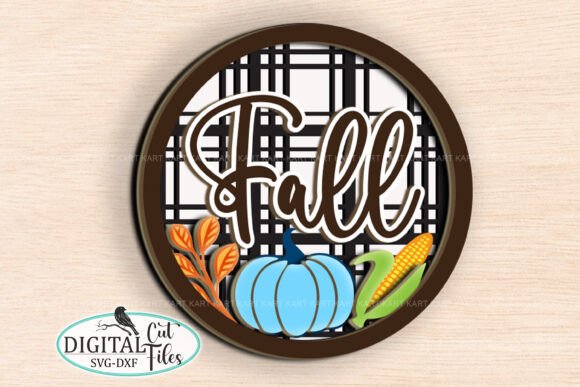
Fall Layered SVG Sign Laser Cut File: A Practical Guide to Flawless Results
Creating a stunning autumn decoration often starts with the right digital foundation. The Fall Layered SVG Sign Laser Cut File offers a sophisticated design that transforms simple materials into a focal point for your home or shop. This specific design, which includes the Fall-Ornament 8S-D pattern, is crafted for laser cut machines and measures approximately 9x9 inches in its native state. It is an instant download containing essential formats like SVG, EPS, and DXF, making it versatile for various software environments. However, owning the file is only the first step; understanding how to handle the digital assets and physical materials is what separates a professional finish from a frustrating project.
Understanding the Digital Assets and Format Compatibility
Many creators rush to open their downloaded files without verifying the contents, leading to immediate confusion when their cutting software fails to recognize the design. The product arrives as a compressed ZIP file, a standard practice for bundling multiple vector formats. A common oversight is attempting to load the ZIP archive directly into laser cutting software like LightBurn, Glowforge Design Space, or Illustrator. These programs cannot read compressed folders; you must unzip the files first to access the individual SVG, EPS, and DXF layers.
Once extracted, you will notice that the file includes instruction boxes detailing which lines are for cutting, scoring, or engraving. A frequent mistake is leaving these instructional elements active during the actual cutting process. If you do not deactivate or delete this instruction box before uploading the design, your machine may attempt to cut or engrave the text meant for human eyes, ruining the aesthetic of your sign. Always take a moment to review the layer structure, hide the instruction text, and ensure only the design geometry remains active for the machine.
Material Selection: Why 3mm Plywood Matters
The quality of your final piece depends heavily on the substrate you choose. While the design can technically be cut from various woods, using the wrong thickness or type can lead to burn marks, incomplete cuts, or structural weakness. For this layered sign, 3mm plywood is the ideal choice. Thicker materials often require multiple passes, increasing the risk of charring the edges, while thinner materials may warp or lack the necessary rigidity for a multi-layered assembly.
Beginners sometimes assume that any wood labeled "plywood" will work equally well. In reality, the grain direction and glue content vary significantly between brands. Cheap plywood with high glue content can produce excessive smoke and leave sticky residue on your lens, requiring constant cleaning. Investing in high-quality birch or basswood plywood ensures cleaner cuts and a smoother surface for painting. Remember, the goal is a clean edge that requires minimal sanding, allowing the paint to adhere evenly without filling gaps left by rough cuts.
Resizing Without Distortion
One of the most appealing features of the Fall Layered SVG Sign Laser Cut File is its scalability. You are not limited to the default 9x9 inch size; you can resize it to fit a large mantel or a small shelf. However, resizing introduces a critical pitfall: aspect ratio distortion. When adjusting the dimensions, many users inadvertently stretch the image horizontally or vertically, causing circles to become ovals and text to look warped.
To avoid this, always lock the proportions when resizing in your design software. Most programs have a chain-link icon or a "constrain proportions" checkbox that must remain enabled. Maintaining the correct aspect ratio ensures that all entitlements and decorative elements align perfectly during assembly. If the layers do not match up due to uneven scaling, the sign will look misaligned and unprofessional, regardless of how well you painted it. Take the time to check the dimensions of each layer individually if you are stacking them manually.
Painting Techniques for a Professional Finish
The visual impact of your layered sign relies on the paint job. Acrylic paint is the recommended medium because it dries quickly, adheres well to wood, and offers vibrant colors suitable for fall themes. A common error is applying thick coats of paint before the previous layer has dried, which can cause smudging or peeling. Instead, apply thin, even coats and allow sufficient drying time between layers.
Another overlooked detail is painting the edges. Since the design is layered, the side profiles of the wood will be visible. Ignoring these edges can make the sign look unfinished. Use a small brush to carefully paint the cut edges of each layer before assembling them. This attention to detail creates a cohesive look where the depth of the layers enhances the design rather than revealing raw wood. Additionally, consider sealing your finished project with a clear matte or gloss spray to protect the acrylic paint from dust and fading over time.
Assembly and Troubleshooting
The project is designed to be easy to assemble, but precision is key. The included instructions guide you through the layering process, but rushing this step can result in a wobbly or unstable sign. Ensure that your adhesive is appropriate for wood and that you apply it evenly. Using too much glue can squeeze out onto the face of the sign, creating a messy appearance that is difficult to clean once dry.
If you encounter difficulties with the design alignment or file setup, remember that support is available. Do not hesitate to message the creator if you find discrepancies in the file or need clarification on the assembly steps. Many issues stem from user error in software settings rather than flaws in the design itself. By communicating early, you can resolve problems before wasting material on a test cut that might fail.
Final Considerations Before Downloading
Before committing to this purchase, verify that your workflow supports the provided file types. Ensure your laser cutter software can import SVG, EPS, and DXF files natively. Also, confirm that you have the necessary tools for unzipping files and basic graphic editing skills to manage layers. Be aware that the monogram font used in the preview is not included in the download, so if you plan to add custom lettering, you will need to source a compatible font separately.
This Fall Layered SVG Sign Laser Cut File is a powerful tool for creators who value efficiency and quality. By avoiding common pitfalls like ignoring file compression, neglecting aspect ratios, or choosing the wrong wood thickness, you can produce a high-end seasonal decoration that stands out. With the right preparation and attention to detail, this digital file becomes more than just a pattern; it becomes a reliable resource for your creative projects.